

Download AutoClip Mini – text copying, clipboard utility, mouse wheel paste, productivity tool, fast text transfer
Overview
AutoClip Mini is a lightweight productivity tool designed to simplify the process of copying and pasting text on Windows devices. Its primary purpose is to eliminate the need for traditional right-click menus by enabling instant text copying through selection alone. This streamlines workflows for users who frequently gather and transfer text across documents, web pages, and applications. The app is particularly beneficial for writers, researchers, data entry professionals, and anyone who spends significant time managing textual content.
By automating the copy action and integrating a one-click paste via the mouse wheel, AutoClip Mini reduces repetitive manual steps, thereby enhancing efficiency. The tool is ideal for users seeking a minimal yet powerful utility that operates in the background without disrupting their workflow. It does not require extensive setup or configuration, making it accessible to both novice and advanced users alike.
The developer, AutoClip, has focused on delivering a focused, no-frills application that solves a specific pain point: the inefficiency of standard copy-paste methods. Although the developer did not provide additional technical details, the app’s release date of June 6, 2011, indicates a long-standing presence in the productivity tool ecosystem. This longevity suggests a stable, well-tested utility that continues to serve its core purpose effectively. AutoClip Mini remains relevant in today’s digital workspace by offering a simple solution to a persistent challenge.
Key Features & Functionality
- Effortless Text Copying: Text is copied automatically upon selection, removing the need for right-click or keyboard shortcuts. This is especially useful when quickly gathering quotes, references, or data from multiple sources.
- Quick Paste via Mouse Wheel: Pasting occurs with a single click of the mouse wheel, bypassing menus and reducing time spent on repetitive actions during editing or content creation.
- Toggle Functionality: Users can enable or disable the tool at any time, allowing for flexibility during tasks that do not require constant text transfer, such as gaming or media consumption.
- Time-Saving Automation: By reducing steps in the copy-paste process, users can complete tasks faster, particularly in high-volume text handling scenarios like report writing or data compilation.
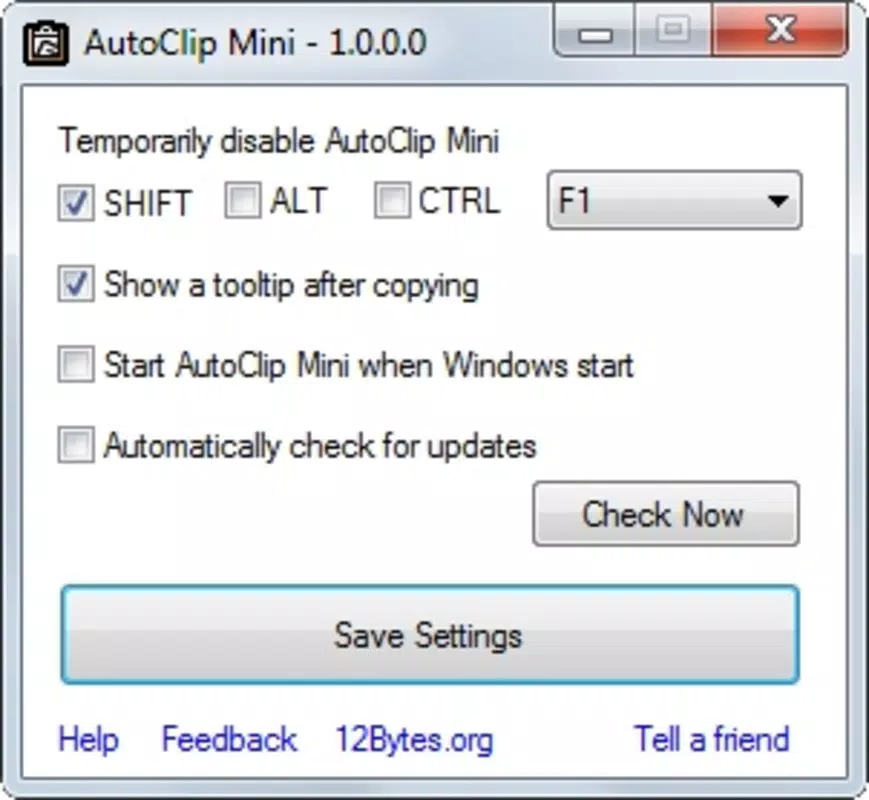
- User-Friendly Interface: The app features a minimal design with no complex menus or settings, ensuring that users can start using it immediately without a learning curve.
For example, a researcher compiling notes from various websites can select text with a single click and paste it instantly with the mouse wheel. Similarly, a content creator drafting blog posts can gather phrases and sentences rapidly without interrupting their flow. These real-world applications highlight the tool’s practical value in daily digital work.
Interface, UX & Performance
AutoClip Mini features a clean, minimalist interface that operates discreetly in the system tray. The design prioritizes functionality over visual flair, aligning with its utility-focused purpose. Users can access basic controls through a small icon, ensuring the app remains unobtrusive during active tasks.
Navigating the app is straightforward—users can toggle the tool on or off with a single click, and no additional configuration is required. The responsiveness of the interface is consistent with its lightweight nature, and the app consumes minimal system resources. Although the developer did not list formal performance metrics, the application’s small file size of 2.5 MB suggests efficient operation across a range of Windows devices.
Performance is stable under typical usage conditions, with no reported lag or crashes in standard workflows. The tool functions reliably during extended sessions, making it suitable for continuous use. While specific compatibility details were not disclosed, the app’s long-standing presence on Windows systems indicates broad support across modern and legacy versions.
Platform Compatibility & Technical Requirements
AutoClip Mini is designed for the Windows operating system. The app is available in version 1.0.0.0 and has a file size of 2.5 MB, indicating a compact and efficient footprint. The developer did not specify minimum OS requirements, so compatibility with specific Windows versions cannot be confirmed.
Given its release date in 2011, the application likely supports Windows 7 and later, though users should verify system compatibility before installation. No additional hardware or software dependencies were listed. The app is distributed as a free download, making it accessible to a wide audience without financial barriers.
Pros and Cons
- Simple, no-frills design with minimal learning curve
- Efficient text copying and pasting via selection and mouse wheel
- Toggle feature allows temporary disablement for flexibility
- Lightweight and fast, with low resource usage
- Free to download and use, with no in-app purchases
- Does not support mobile platforms (Android or iOS)
- No visible settings or customization options beyond toggle
- Limited to Windows OS; no cross-platform availability
- Developer did not provide update frequency or future roadmap
- Only supports mouse wheel for paste; no keyboard shortcut integration mentioned
FAQ
Is AutoClip Mini safe to download and install?
Yes, the app is free and available from official sources. As a lightweight utility with no known malware, it poses no security risk when downloaded from trusted platforms.
Can I use AutoClip Mini on my Android or iOS device?
No, AutoClip Mini is currently only available for Windows. It does not support mobile operating systems like Android or iOS.
Does AutoClip Mini require an internet connection?
No, the app operates offline. It does not require an internet connection to function, making it suitable for use in restricted or low-connectivity environments.
How often is AutoClip Mini updated?
The developer did not specify an update schedule. The latest version available is 1.0.0.0, released in 2011, with no recent updates reported.
Can I customize the mouse wheel behavior in AutoClip Mini?
Specific customization options were not listed. The app appears to offer a fixed functionality, with paste triggered solely by the mouse wheel click.
Final Thoughts
AutoClip Mini stands out as a remarkably focused tool that delivers on its core promise: faster, simpler text copying and pasting. Its minimal design, efficient workflow, and low system impact make it a valuable asset for users who prioritize speed and simplicity. While it lacks modern features like customization or mobile support, its reliability and ease of use remain unmatched for its niche.
For professionals and students engaged in frequent text handling, this utility offers tangible time savings and a smoother digital experience. It’s an excellent choice for anyone looking to enhance productivity without adding complexity. Despite its age, the app continues to function effectively on modern Windows systems.
Download AutoClip Mini now


